The types of memory storage available in the JVM | (Thu 09 May 2024 07:33)
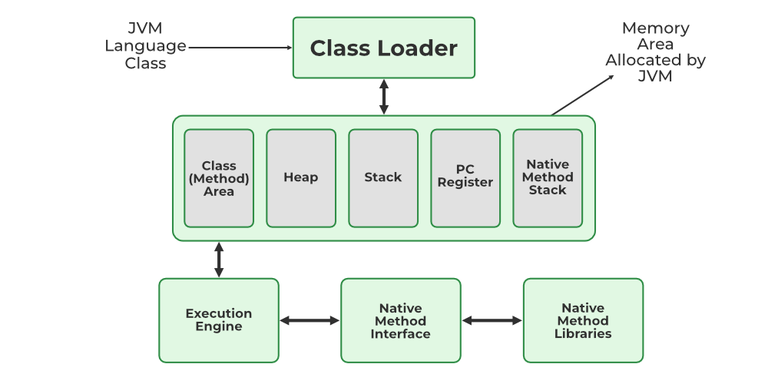
The Java Virtual Machine (JVM) Memory Management
The Java Virtual Machine (JVM) is an essential part of the Java Runtime Environment (JRE), responsible for executing Java programs by converting bytecode into machine-level instructions. One of its core responsibilities is efficient memory management, ensuring that Java applications run reliably and perform well. The JVM divides memory into several distinct areas, each with its own purpose, structure, and lifecycle. This article provides a detailed explanation of these memory regions and their roles in the execution of a Java program.
The Class Area, often referred to as the Method Area, is a memory space that holds class-level data shared among all threads. This includes:
-
Class structure information like method names, field names, and access modifiers.
-
Runtime constant pool, which stores string literals and references used by the JVM during execution.
-
Static variables, which belong to the class rather than any specific object.
-
Bytecode of methods and constructors, which the JVM interprets and executes.
The Class Area is created when the JVM starts and persists until the JVM shuts down. It is shared across all threads, meaning changes to static fields by one thread are visible to others. Because of its central role in class loading and method execution, this area must be managed efficiently to prevent memory leaks and class loading errors.
The Heap is the largest memory area in the JVM and is used for dynamic memory allocation. Whenever you create an object using the new keyword, it is stored in the heap.
The heap is divided into two main regions:
-
Young Generation: Stores short-lived objects. It includes Eden space and two Survivor spaces. Most objects are created here and quickly garbage collected.
-
Old (Tenured) Generation: Stores long-lived objects that survive several rounds of garbage collection in the Young Generation.
The heap is shared among all threads and is the area managed by the Garbage Collector (GC). The GC automatically reclaims memory used by objects no longer referenced by any part of the program. Efficient heap management is vital for avoiding OutOfMemoryErrors and maintaining application performance.
Each thread running in a Java application has its own JVM Stack. This memory area is used for:
-
Storing local variables of a method.
-
Method call frames, which contain the parameters, return values, and other data needed to execute a method.
-
Tracking execution order, such as which method is currently being executed.
The stack follows the Last In, First Out (LIFO) principle. When a method is invoked, a new frame is pushed onto the stack. When the method execution completes, the frame is popped off. Since each thread has its own stack, this area is not shared among threads, which avoids race conditions in local variable usage.
Unlike the heap, the stack memory is not garbage collected. If a thread uses too much stack memory—typically due to deep recursion or infinite loops—a StackOverflowError is thrown.
The Program Counter Register is a small memory space specific to each thread. It holds the address of the JVM instruction currently being executed. The JVM is designed to support multithreading, so each thread needs its own PC register to track the flow of execution independently.
-
When a Java method is being executed, the PC holds the address of the current bytecode instruction.
-
If the method is native (i.e., written in C/C++), the value in the PC register is undefined.
The PC register plays a crucial role in enabling the JVM to execute Java bytecode in sequence and ensures proper execution flow within methods and during method calls.
Java supports native methods—functions written in languages like C or C++—through the Java Native Interface (JNI). When a Java application calls a native method, the JVM uses a separate memory area called the Native Method Stack.
This stack:
-
Stores information needed for native method execution.
-
Helps bridge the gap between JVM-managed memory and the underlying platform-specific system libraries.
Like the regular Java stack, each thread has its own Native Method Stack, and it is used only when the thread is executing a native method. Errors in native code may result in unspecified behavior or crashes, so this area is carefully managed and often protected by the JVM's security manager.
Memory management in JVM is critical for application performance, stability, and scalability. Some of the benefits of understanding and optimizing JVM memory include:
-
Preventing memory leaks that can degrade performance or crash the application.
-
Reducing garbage collection pauses by optimizing object lifecycle and heap usage.
-
Ensuring thread safety through isolated stacks and program counters.
Java developers can monitor and tune JVM memory using tools like JVisualVM, JConsole, or Garbage Collection logs. Advanced tuning options like heap sizing (-Xms, -Xmx), garbage collector selection (e.g., G1, ZGC), and stack size (-Xss) provide additional control over how memory is used.

Physics, Chemistry, Biology and Geography.

Computer Programming, languages & their frameworks.

Economics, Accounts and Management.

Reviewing old and new books.

Ancient, Medieval, Modern, World History.

Indian Constitution, Politics, Policies, etc.

Everything related to International Affairs.

For all humanities topics, except History & Polity.

Anything related to entertainment industry.

Mainly Cricket but other sports too.

CS, IT, Services & Corporate Sector.
Comments
No comments yet. Be the first to comment!
Leave a Comment